What is Stock Transfer?
Stock transfer is the process of sending/transferring stock from one location to another location.
When the stock transfer is done, the stock level decreases from the Location (From) and increases in Location (To).
- This stock level change happens only if the Status is Completed
- Stock changes don’t happen for other statutes like Pending and In-Transit
- Once the status is marked completed stock transfer cannot be edited. But can be deleted
Editing stock transfer
Stock transfer can only be edited when the status of the transfer is pending or in transit.
NOTE: After the stock transfer is marked completed, the stock transfer cannot be edited. However, you can delete it and create a fresh one if you would like to.
Stock not showing in Location(to)
- Make sure product is Added to the location
- Make sure transfer status is completed
Show/Hide Price During Stock Transfer
While transferring the stock, you can hide the price of the product from certain users. The user who is responsible to just transfer the goods from one location to another location can be restricted to see the price and only add the transfer for the goods.
This can be achieved by following the steps below.
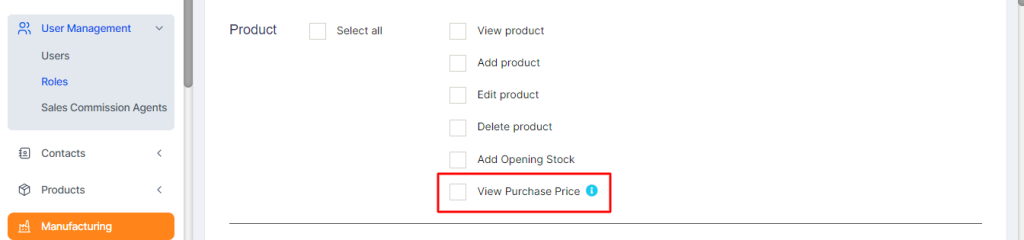
Step 1: Go to User Management > Roles
Step 2: Click the edit button of the required role, e.g., Warehouse Worker
Step 3: Under the Product Section, you can disable the ‘View Purchase Price’ checkbox. If this is disabled, the user with the particular role can’t see the price while transferring.